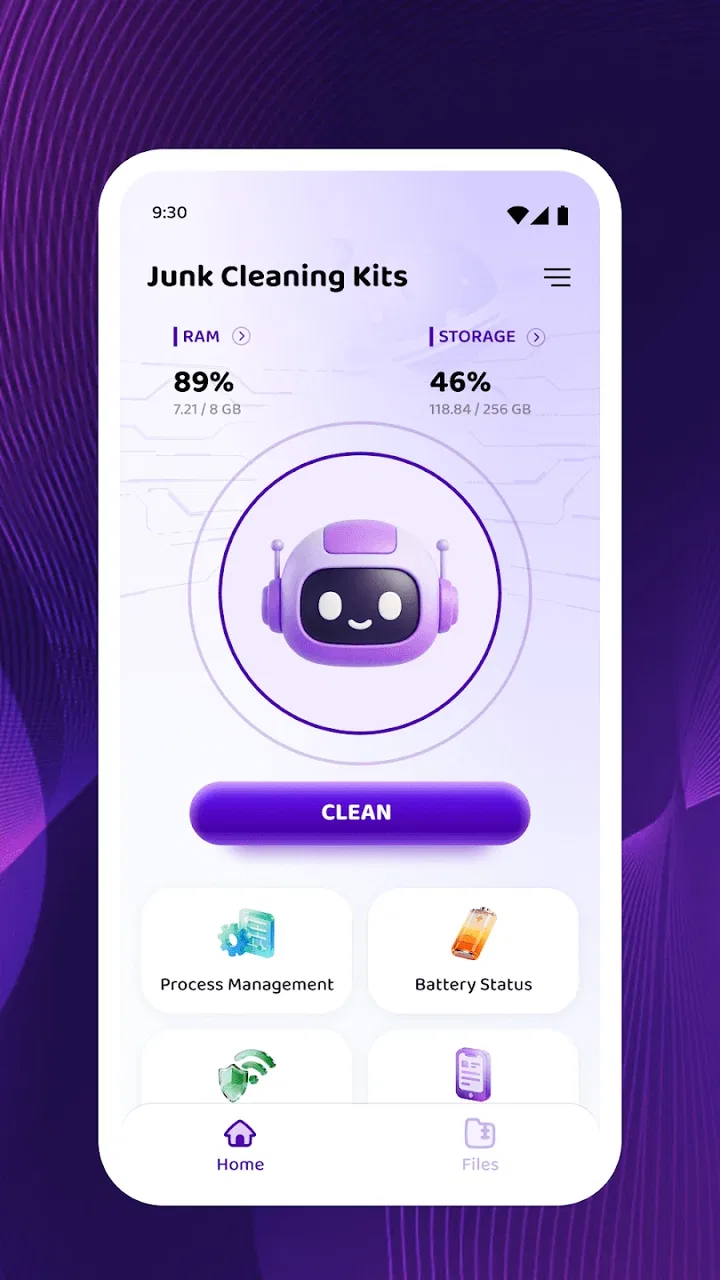
Junk Cleaning Kits
- 4.2
- Rating
- 50.00K
- Installs
- Free
- Price

 Analysis by App-foxy
I approached Junk Cleaning Kits as the kind of small utility that promises to solve an annoying phone problem without turning the process into a project. Its purpose is straightforward: help clear unwanted files from an Android device. After using it, my impression is that its appeal comes from simplicity rather than ambition. It is a focused tool in the utilities category, developed by mohammeeschu, and it is free to use.
The first thing I noticed is how easy it is to understand the app’s role. This is not a broad phone-management suite trying to cover storage analysis, battery monitoring, privacy controls, device boosting, and every other maintenance task at once. The central idea is cleaning junk, and that narrow purpose makes it approachable for someone who does not want to learn a complicated interface.
That simplicity is also the key question for long-term use. A cleaner can feel useful during the first session, especially when a phone has accumulated temporary leftovers, but the real test is whether it remains helpful after the initial cleanup. In my view, this app has a reasonable place as an occasional maintenance tool, although users expecting a complete storage-management system may eventually want something more detailed.
You May Also Like

 AccuWeather: Weather Radar
AccuWeather Review: A Quick, Clear Forecast for Everyday Decisions
For everyday plans, the best forecast is the one you can understand quickly. AccuWeather makes rain timing, radar, and local conditions easy to act on, with a few trade-offs.

 Hill Climb Racing
Why Hill Climb Racing Still Turns Crashes Into One More Run
A tiny car, a bumpy hill and one more upgrade: Hill Climb Racing keeps resurfacing because its simple chaos makes every near-miss feel personal.

 AliExpress - Shopping App
AliExpress Makes Global Shopping Feel Personal, but Shoppers Bear the Risk
AliExpress turns a global marketplace into a pocket-sized discovery engine. Its reach is useful, its shopping loop compelling, and its trade-offs easy to miss.

 Lords Mobile: Kingdom Wars
Lords Mobile Is a Kingdom-Building Routine, Not a Quick Match
A case-by-case verdict on the building, battles, device demands, and social commitments that make Lords Mobile rewarding for some players and exhausting for others.

 PDF Scanner app - TapScanner
TapScanner Makes Paperwork Easier to Capture, Check, and Share
TapScanner makes scanning with a phone feel less like a rescue operation and more like a dependable step in getting work done. Its capture tools are useful, though not flawless.

 Block Blast!
 Shows How Much a Puzzle Game Can Leave Out
A quiet grid game shows why puzzle players increasingly value instant clarity, repeatable skill and low-pressure play—and where the genre still needs to catch up.
More From Our News Desk
View All News


What the first week feels like
During the first week, a junk-cleaning app has an obvious advantage: it gives you a clear task to perform. Instead of opening several folders and guessing which files are safe to remove, I can use a dedicated utility as a starting point. That makes the experience less intimidating for people who know their storage is filling up but do not feel comfortable browsing system folders manually.
The app’s store summary describes it as a simple tool for clearing junk files, and that description matches the way I would position it to a friend. It is best understood as a quick maintenance assistant, not as a replacement for careful file management. The distinction matters because “junk” can mean different things on different phones. Temporary leftovers may be easy to remove, while downloads, old documents, photos, and videos often have personal value even when they have not been opened recently.
My practical advice is to use the first session as an inspection opportunity rather than treating the cleaning action as something to repeat immediately. Before confirming any removal, I would look at the categories or items shown and pause if a file might be needed later. A cleaner is most useful when it reduces uncertainty, not when it encourages automatic deletion.
One realistic use case is a phone that has become uncomfortable to use after months of everyday messaging, browsing, and app activity. A user may not want to spend an evening searching through folders. Opening a focused cleaning tool can provide a faster first step, particularly for someone who only needs to recover a little breathing room and does not want a technical storage audit.
Another useful scenario is preparing a phone for travel. Before downloading offline maps, playlists, or documents, I might run a cautious cleanup to remove disposable clutter. The benefit is not that the app transforms the device; it is that it can make a small amount of preparation feel organized. That is a modest but genuine strength.
The app is also accessible from a compatibility standpoint. It supports Android devices running version 8.0 or later, so it is aimed at a wide range of phones rather than only recent hardware. Its Everyone content rating also makes the intended audience broad. I would still explain the cleaning process to a less technical family member, because an age rating does not remove the need to understand what is being deleted.
Its early reception is encouraging without being decisive. The app has an average rating of 4.2 from around 150 ratings, and it has passed 50 thousand installs. I read that as a sign that the basic idea works for a meaningful group of users, but not as proof that every phone will benefit equally. Cleaning results depend heavily on how much disposable material a device has accumulated in the first place.
Where the early appeal is strongest
The strongest first-week benefit is reduced friction. A dedicated cleaner gives storage maintenance a visible place in your routine. If you have been postponing cleanup because the built-in file manager feels too scattered, a focused app can help you begin. That matters more than flashy presentation for this particular job.
I also like the possibility of using it as a checkpoint before making larger decisions. If the phone feels full, I would try a junk cleanup first, then check whether the storage problem remains. If there is still little space afterward, that tells me the real issue is probably personal media, large downloads, or applications rather than temporary clutter. In that sense, the app can help separate a minor maintenance problem from a deeper storage problem.
That is one of the less obvious ways to get value from it: do not judge the result only by how much space disappears. Use the result diagnostically. If the cleanup changes very little, avoid repeating it again and again. Move on to reviewing large files or unused apps through the phone’s own settings instead.
Month-to-month value and the habit question
After the novelty fades, the app has to earn its place through repetition. Junk cleaning is not normally a daily activity. Running a cleaner too often can become pointless, especially if the phone already manages temporary files effectively or if the user rarely downloads large amounts of content. I would treat this app as an occasional check rather than something that needs constant attention.
A sensible habit is to connect cleanup with a real trigger. For example, I might open it before a major trip, after a long period of heavy app use, or when a low-storage warning appears. This approach avoids turning maintenance into a ritual with no clear purpose. It also makes the app easier to evaluate: if it consistently helps at those moments, it has recurring value; if it never changes the situation, it may not deserve regular space.
For a family member who is not comfortable with Android storage settings, the app could remain useful as a simple first-line tool. I would show that person how to review the results and avoid deleting anything recognizable or important. For a more experienced Android user, its lasting value is narrower. Someone who already uses the built-in storage manager and understands file locations may prefer the control and detail of those native tools.
This is where the free price helps. Because there is no purchase cost, the threshold for keeping it installed is low. I do not feel pressured to justify a subscription or recover an investment. At the same time, free does not automatically mean essential. If the app sits unused for months, uninstalling it and reinstalling it when needed may be more sensible than treating every utility as permanent.
The current version is 1.0.2, which gives the app a relatively early feel in its life. I would approach long-term dependence with a little patience and keep the phone’s own storage controls in mind as a fallback. An early utility can be perfectly useful, but a mature maintenance habit should not rely on one small app alone.
A practical recurring workflow
My preferred workflow is deliberately conservative. First, I check the phone’s available storage so I know whether there is a real problem. Next, I run the cleaner and review what it identifies. I remove only items that clearly look disposable, then return to storage settings to see whether the phone actually feels less constrained. Finally, I handle the remaining issue separately by deleting forgotten downloads, moving personal media, or removing apps I no longer use.
This sequence prevents a common mistake: assuming that one cleaning pass can solve every storage problem. It also gives the app a defined role. Junk Cleaning Kits handles the quick, low-effort portion; the phone’s native tools handle the decisions that require more context. That combination is more reliable than asking a cleaner to make every judgment on your behalf.
Another useful habit is to avoid cleaning immediately before you need a file. If I am about to travel or present documents, I would review important downloads first and create a clear folder for anything I want to keep. That reduces the chance of confusing an old file with an unwanted one. The app can support maintenance, but it cannot know the personal meaning of every item on a device.
Maintenance burden and everyday limitations
The app’s maintenance burden appears low because its purpose is narrow, but the user still carries the important responsibility: deciding what is safe to remove. That is the main trade-off. A simple cleaner can make the process faster, yet simplicity may also mean fewer explanations for users who want to understand every file category before taking action.
I would not use any cleaning result as an automatic instruction. Cached material can often be regenerated, but a file that looks old may still be useful. Downloads, exported documents, images, and media deserve a separate look. When in doubt, I would leave the item alone and use a file manager or the relevant app to identify it properly.
There is also a practical limit to what a junk cleaner can accomplish. If most of the storage is occupied by high-resolution photos, videos, offline content, or large applications, removing temporary clutter may produce only a small improvement. That is not necessarily a failure; it simply means the problem is not junk. Users should avoid repeatedly scanning for a dramatic result when the storage pressure comes from valuable personal files.
For that reason, I see the app as more appropriate for light maintenance than emergency recovery. If the phone is nearly full and an important update or recording cannot be completed, I would go directly to the largest-file view in the device settings and make deliberate decisions. A focused cleaner may still be worth trying, but it should not be the only plan.
Privacy is another area where I would remain attentive whenever using a file-cleaning utility. I would read the on-screen descriptions carefully and avoid granting access casually. The app’s purpose does not give it permission to decide what matters to me. My rule is simple: use the narrowest access and the clearest confirmation available, and do not rush through prompts just because the interface looks uncomplicated.
The developer, mohammeeschu, has kept the product identity focused around cleaning rather than presenting it as an all-purpose device optimizer. I appreciate that restraint. Still, focused branding can raise expectations that the cleaning result will be equally clear on every phone. Android devices differ in how they handle temporary data, and the usefulness of a cleaner can vary accordingly.
What may cause fatigue over time
The first source of fatigue is repetition without visible benefit. If I run the app every few days and see little change, the process quickly becomes background noise. A maintenance tool should respond to a need, not create one. I would rather use it occasionally and keep the routine tied to low-storage warnings or specific preparation tasks.
The second is uncertainty. If the app presents items without enough context, I may spend more time wondering what is safe than I would have spent using the phone’s own storage screen. That is the point at which a more detailed alternative becomes better. Control matters more than speed when the files are personal or difficult to replace.
The third is the gap between cleaning and organization. Removing disposable material can make a phone feel tidier, but it does not sort photographs, consolidate downloads, or decide which applications deserve to stay. Users who want a complete digital housekeeping system may find this tool too limited. I would pair it with native storage controls rather than expecting it to manage the entire device.
A final source of fatigue is installing a utility that is rarely needed. Since the app is free, keeping it available is not expensive in financial terms, but every installed app adds another icon and another maintenance decision. If your phone has ample space and you already review storage manually, this particular tool may not offer enough recurring value to justify permanent space.
Who should use it and who should skip it
I would recommend Junk Cleaning Kits to someone who wants a straightforward starting point for removing disposable clutter and does not enjoy navigating Android’s storage menus. It is also a reasonable option for a shared household where one person occasionally helps another keep a phone usable. The narrow purpose and broad compatibility make it approachable for that audience.
I would be more cautious about recommending it to power users who want detailed control over every folder, duplicate detection, large-file sorting, or a complete storage dashboard. Those users are usually better served by the built-in Android tools or a more comprehensive file-management application. More features are not automatically better, but detailed storage problems need detailed tools.
I would also skip it as a first choice if the phone’s main problem is a large photo library, video collection, or offline media. In that situation, the right answer is usually organization, transfer, backup, or selective deletion. A junk cleaner can address the easy layer of the problem, but it cannot replace those decisions.
For older Android hardware that meets the minimum operating-system requirement, a focused utility may feel preferable to a large all-in-one optimizer. The lighter concept is easier to understand and keeps the user’s attention on one task. Even then, I would judge it by results on that specific phone rather than assuming that every device will produce the same benefit.
My long-term verdict
After looking past the initial satisfaction of pressing a cleaning button, I see Junk Cleaning Kits as a useful occasional companion rather than a permanent centerpiece of phone maintenance. Its appeal is real: the app is free, focused, accessible on Android 8.0 and later, and easy to explain to someone who wants help with unwanted files. The rating of 4.2 and its audience of over 50 thousand installs suggest that the concept has found a receptive group, though those figures should be treated as context rather than a guarantee.
What earns it a place is the way it lowers the barrier to a first cleanup. What limits it is the same simplicity. It cannot make personal storage decisions for me, and it is not the right answer when large, meaningful files are the reason a phone is full. Its best role is to clear the disposable layer, then hand the more important choices back to the user.
My recommendation is to install it when you want a simple cleanup checkpoint, use it carefully, and judge whether it produces a noticeable improvement on your own device. Tie it to real moments instead of running it out of habit. If it helps before travel, after months of clutter, or during a low-storage problem, keeping it available makes sense. If it repeatedly finds little of value, the phone’s built-in tools are probably enough.
The lasting value here comes from disciplined use, not constant use. Junk Cleaning Kits earns a modest recommendation for people who want an uncomplicated way to begin cleaning Android storage. I would keep expectations realistic, review every deletion, and treat the app as one step in a sensible maintenance routine rather than a complete solution.
FAQs for Junk Cleaning Kits
01What is Junk Cleaning Kits and how does it work?
Junk Cleaning Kits is a utility app designed to optimize your smartphone’s performance by removing unnecessary files and clutter. It scans your device for temporary files, cache, and residual files left by uninstalled apps, providing an easy way to clean up space and enhance speed. The app also offers additional tools like memory boosters and battery savers.
02Is Junk Cleaning Kits safe to use on my device?
Yes, Junk Cleaning Kits is designed with user safety in mind. It only removes files that are confirmed to be unnecessary or safe to delete. Furthermore, the app does not access personal data or sensitive information, ensuring your privacy is protected while using its cleaning features. Regular updates also enhance its security protocols.
03Does Junk Cleaning Kits support both Android and iOS devices?
Yes, Junk Cleaning Kits is available for both Android and iOS platforms. The app is optimized to work seamlessly on a wide range of devices, ensuring that users on both operating systems can benefit from its cleaning and optimization features. Users can download it from the Google Play Store or Apple App Store.
04Are there any in-app purchases or ads in Junk Cleaning Kits?
Junk Cleaning Kits offers a free version that includes basic cleaning features. However, users may encounter some advertisements. For an ad-free experience and access to advanced tools like deep cleaning and real-time monitoring, a premium version is available through in-app purchases. This allows users to choose the level of service that best fits their needs.
05How often should I use Junk Cleaning Kits to maintain my device's performance?
To keep your device running smoothly, it's recommended to use Junk Cleaning Kits at least once a week. Regular cleaning helps prevent the buildup of unnecessary files that can slow down your device. However, users with extensive app usage or limited storage might benefit from more frequent cleaning sessions.
Pros
- Efficiently clears cache for more storage.
- Boosts device speed and responsiveness.
- User-friendly interface for easy navigation.
- Includes battery optimization features.
- Customizable cleaning schedules.
Cons
- Contains ads that can be intrusive.
- Limited features in the free version.
- Occasional false positives in file detection.
- Requires permissions that may concern privacy.
- Performance dips on older devices.

Junk Cleaning Kits
Gallery